

openlist-新拟态美化
openlist-新拟态美化
清晨的露珠,是夜的眼泪,也是日的希望,世界因此而多姿。
原Github简介
Openlist新拟态戏法---摘自大强同学
- 新拟态之风盛行日久,然终不过是视觉骗术。世间美化仓库遍地,皆如”粉饰太平”之辈,涂抹颜色,堆砌阴影,自以为得计。唯独这一家”玄牝之司”,偏要装神弄鬼,弄出个什么”
- 这”新拟态”,说来可笑。它既不是扁平的,又不完全是立体的;既要光,又要影,却不使人看清真面目。活像个”两面人”,站在光暗之交,左右逢源。更可笑的是,别人家的美化如同”绣花枕头”,只管外表光鲜。这厮却要”探囊取物”,深入OPENLIST五脏六腑,将那些”阴面”、“阳面”都算计得明明白白。它像个”偷窥者”,躲在前者内部,暗中观察每个元素的起承转合。
- 此仓库虽弄出新花样,终究也是「以巧补拙」。
小声哔哔:
- ✨感谢大佬的倾心付出,特意去Github克隆了大佬的仓库,但是有部分内容不符合自己的要求,所以便有了如下修改。
- ✨大强同学Github仓库
- ✨B站视频演示
效果如下
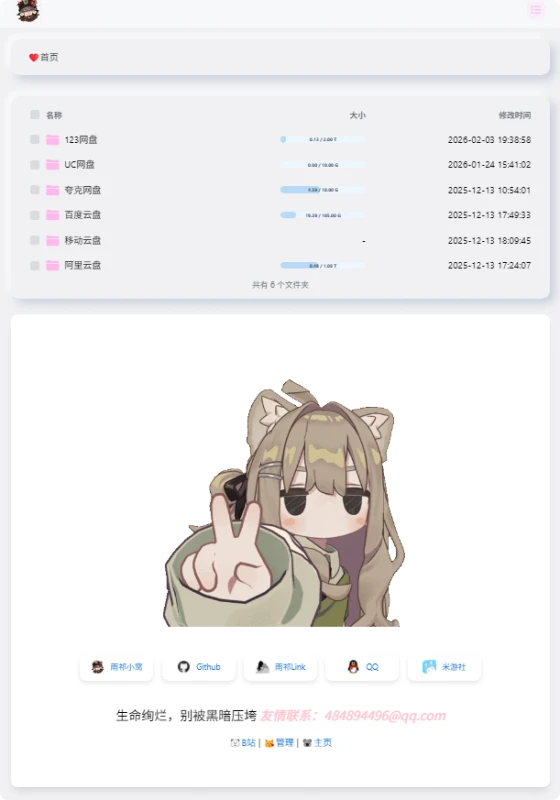
使用方法
自定义头部
- 在后台设置-全局,找到自定义头部,写了两套方案,可根据喜好选择。
- 方案一为新拟态,可以直接复制自定义头部代码、自定义内容代码、元数据代码直接粘贴到openlist后台相应位置使用。
- 方案二为图片背景,观感上建议只用自定义头部和自定义内容代码,使用位置相同。
点击查看
方案一 新拟态
<style type="text/css">
body {
  /* 新拟态核心色调 */
  --neumorph-bg: #f0f0f3;
  --shadow-dark: rgba(163, 177, 198, 0.5);
  --shadow-light: rgba(255, 255, 255, 0.8);

  /* 仅修改背景部分(不影响 flex/布局) */
  background: var(--neumorph-bg) !important;
  background-image: none !important;  /* 确保无额外背景图干扰 */

  /* 纯背景新拟态(不干扰内容) */
  position: relative;  /* 确保背景覆盖完整 */
}

/* 添加一个伪元素作为背景层(避免影响内容布局) */
body::before {
  content: "";
  position: fixed;
  top: 0;
  left: 0;
  width: 100%;
  height: 100%;
  z-index: -1;  /* 确保在底层 */

  /* 新拟态背景效果 */
  background: var(--neumorph-bg);
  box-shadow:
    inset 6px 6px 12px var(--shadow-dark),
    inset -6px -6px 12px var(--shadow-light);
}

/* 以下所有代码保持原样,不修改宽度、高度或布局 */
.markdown-body,
.main-content {
  width: 100%;
  max-width: 800px;
  padding: 30px;
  margin: 0 auto;
  text-align: center;
}

.hope-c-PJLV-idaeksS-css,
.hope-c-hOYTCS,
.hope-c-PJLV-igScBhH-css {
  background: var(--neumorph-bg) !important;
  border-radius: 15px !important;
  box-shadow:
    8px 8px 15px var(--shadow-dark),
    -8px -8px 15px var(--shadow-light) !important;
  border: none !important;
  transition: all 0.3s ease;
  padding: 15px 25px !important;
  margin: 10px auto !important;
  display: inline-block !important;
  cursor: pointer;
}

.markdown-body pre,
.hope-c-ctSAUo {
  background: var(--neumorph-bg) !important;
  box-shadow:
    inset 3px 3px 5px var(--shadow-dark),
    inset -3px -3px 5px var(--shadow-light) !important;
  border-radius: 10px !important;
  padding: 15px !important;
  margin: 0 auto 20px !important;
  max-width: 90%;
}

.footer {
  text-align: center !important;
  margin-top: 30px;
  opacity: 1 !important;
}

.copyright {
  display: flex;
  flex-direction: column;
  align-items: center;
  justify-content: center;
}

@media screen and (max-width: 960px) {
  body {
    padding: 10px;
  }

  .markdown-body,
  .main-content {
    padding: 15px;
    max-width: 95%;
  }
}
</style>
方案二 图片背景
<style type="text/css">
/* 新拟态核心色调保留 */
:root {
  --neumorph-bg: #f0f0f3;
  --shadow-dark: rgba(163, 177, 198, 0.5);
  --shadow-light: rgba(255, 255, 255, 0.8);
}

/* 背景图片设置 */
body {
  background: url('https://i.postimg.cc/TPqcm4zm/hu-tao55.jpg') no-repeat center center fixed !important;
  background-size: cover !important;
  position: relative;
}

/* 半透明遮罩层确保内容可读性 */
body::before {
  content: "";
  position: fixed;
  top: 0;
  left: 0;
  width: 100%;
  height: 100%;
  z-index: -1;
  background: rgba(0, 0, 0, 0.3); /* 可根据图片调整透明度 */
}

/* 内容区域样式 */
.markdown-body,
.main-content {
  width: 100%;
  max-width: 800px;
  padding: 30px;
  margin: 20px auto;
  text-align: center;
  background: rgba(255, 255, 255, 0.85) !important;
  border-radius: 15px;
  box-shadow: 0 10px 30px rgba(0, 0, 0, 0.2);
}

/* 保留原有新拟态元素样式 */
.hope-c-PJLV-idaeksS-css,
.hope-c-hOYTCS,
.hope-c-PJLV-igScBhH-css {
  background: rgba(240, 240, 243, 0.9) !important;
  border-radius: 15px !important;
  box-shadow:
    8px 8px 15px var(--shadow-dark),
    -8px -8px 15px var(--shadow-light) !important;
  border: none !important;
  transition: all 0.3s ease;
  padding: 15px 25px !important;
  margin: 10px auto !important;
  display: inline-block !important;
  cursor: pointer;
}

.markdown-body pre,
.hope-c-ctSAUo {
  background: rgba(240, 240, 243, 0.9) !important;
  box-shadow:
    inset 3px 3px 5px var(--shadow-dark),
    inset -3px -3px 5px var(--shadow-light) !important;
  border-radius: 10px !important;
  padding: 15px !important;
  margin: 0 auto 20px !important;
  max-width: 90%;
}

/* 响应式设计 */
@media screen and (max-width: 960px) {
  body {
    padding: 10px;
  }

  .markdown-body,
  .main-content {
    padding: 15px;
    max-width: 95%;
  }
}
</style>
自定义内容
- 在后台设置-全局-自定义内容,找到自定义内容复制粘贴即可。
- 貌似有两份一样的文件,注释了一份,但是两套都粘贴进去也可以用且底部文字会隐藏,虽然不懂,但是大受震撼😢。
点击查看
<div id="customize" style="">

            </div>
        </center>
        <br>
    </center></div>
<!--延迟加载范围到这里结束-->
</div>

<!--延迟加载配套使用JS-->
<script>
    let interval = setInterval(() => {
        if (document.querySelector(".footer")) {
            document.querySelector("#customize").style.display = "";
            clearInterval(interval);
        }
    }, 100);
</script>

<!--点击烟花-->
<!--<script async src="https://cdn.jsdelivr.net/gh/mocchen/cssmeihua/js/yanhuabowen.js"></script>-->

<span class="js-cursor-container"></span>
<script async src="https://cdn.jsdelivr.net/gh/mocchen/cssmeihua/js/xiaoxingxing.js"></script>
<!--樱花飘落二选一-->
<script src="https://files.cnblogs.com/files/quaint/sakuraPlus.js"></script>
<!--<script async src="https://cdn.jsdelivr.net/gh/iVampireSP/special-JavaScript/yinghua.js"></script>-->

<!--音乐歌词美化-->
<script src="https://npm.elemecdn.com/granim@2.0.0/dist/granim.min.js"></script>
<script>
var granimInstance = new Granim({
    element: '#canvas-basic',
    direction: 'left-right',
    isPausedWhenNotInView: true,
    states : {
        "default-state": {
            gradients: [
                ['#a18cd1', '#fbc2eb'],
                 ['#fff1eb', '#ace0f9'],
                 ['#d4fc79', '#96e6a1'],
                 ['#a1c4fd', '#c2e9fb'],
                 ['#a8edea', '#fed6e3'],
                 ['#9890e3', '#b1f4cf'],
                 ['#a1c4fd', '#c2e9fb'],
                 ['#fff1eb', '#ace0f9']

            ]
        }
    }
});
</script>

<!-- 音乐增强 -->
<script>
  window.initMuscPlus = false;
  window.$q = window.$q || function(val) { return document.querySelector(val) }
  window.$qa = window.$qa || function(val) { return Array.from(document.querySelectorAll(val)) }

  // 生成随机渐变色
  function generateRandomGradient() {
    const randomColor = () => `rgba(${Math.floor(Math.random() * 255)}, ${Math.floor(Math.random() * 255)}, ${Math.floor(Math.random() * 255)}, ${Math.random().toFixed(2)})`;
    const color1 = randomColor();
    const color2 = randomColor();
    darkUIChange();
    return `linear-gradient(to right, ${color1}, ${color2})`;
  }

  ;(function(){
    let style = document.createElement('style')
    style.innerHTML = `
      .music-plus .aplayer .aplayer-lrc {
        position: fixed;
        top: 180px;
        left: 0;
        right: 0;
        width: 88%;
        height: 100px;
        max-width: 1000px;
        margin: 0 auto;
        padding: 50px 0;
        transform: scale(1.3);
        z-index: 999;
        background: ${generateRandomGradient()}; /* 随机渐变背景 */
        backdrop-filter: blur(10px); /* 添加高斯模糊效果 */
        box-shadow: 0 4px 8px rgba(0,0,0,0.5); /* 添加阴影,增加立体感 */
        transition: background 0.5s ease; /* 平滑过渡渐变背景 */
      }
      .music-plus .aplayer .aplayer-lrc-current {
        font-weight: bold;
        transform: scale(0.95) !important;
      }
      .music-plus .aplayer .aplayer-lrc p {
        color: #fff; /* 设置歌词文字颜色为白色 */
        opacity: 1; /* 设置透明度 */
        transform: scale(0.9);
      }
      .music-control {
        position: absolute;
        right: 4px;
        top: 4px;
        display: flex;
        align-items: center;
      }
      .music-control i {
        cursor: pointer;
        width: 22px;
        height: 22px;
        display: flex;
        align-items: center;
        justify-content: center;
        font-size: 14px;
        border-radius: 50%;
        background: rgba(255, 255, 255, 0.2); /* 控制按钮背景颜色 */
        margin-left: 4px;
        font-style: normal;
      }
      /*电脑模式音乐歌词容器设置*/
      @media screen and (min-width: 1200px) {
        .music-plus .aplayer .aplayer-lrc {
          left: 0;
          right: 0;
          width: 410px;
          height: 100px;
          padding: 100px 0;
          top: 212px;
        }

      }
    `
    document.body.appendChild(style)

  })();

  setTimeout(() => {
    let stack = document.querySelector('#musicPlus2')
    let span = document.createElement('span')
    span.innerHTML = '|'
    stack.appendChild(span)
    let a = document.createElement('a')
    a.style = `padding: var(--hope-space-1_5); cursor: pointer; `
    a.innerHTML = '音乐加强'
    a.onclick = changeMusic
    stack.appendChild(a)

    document.addEventListener('keydown', function(e) {
      if (e.ctrlKey) {
        const type = ['4', '['].includes(e.key) ? 1 : ['6', ']'].includes(e.key) ? 3 : ['5', '\\'].includes(e.key) ? 2 : null
        if (type) {
          e.preventDefault()
          e.stopPropagation()
          musicMove(type)
        }
      }
    })
  }, 1000)

  function darkUIChange() {
    // 获取当前页面宽度,设置样式
    var documentWidth = $(document).width();
    let widthIsMin = 0;
    if (documentWidth<600){
    widthIsMin = 1;
    }
    // 黑夜模式调整样式
    let isDarkUI= document.querySelector('.hope-ui-dark')
    if (isDarkUI){
     $(".music-plus .aplayer .aplayer-lrc").css("top", "315px");
     // 小屏幕 手机 调整样式
     if(widthIsMin){
        $(".music-plus .aplayer .aplayer-lrc").css("top", "332px");
      }
    }

  }

  function changeMusic() {
    let lrcWarp = document.querySelector('.aplayer .aplayer-lrc')
    if (!lrcWarp) return alert('没有找到歌词容器')

    if (!window.initMuscPlus || !$q('.music-control')) {
      let control = document.createElement('div')
      control.className = 'music-control'
      control.innerHTML = `<i onclick="musicMove(1)" title="CTRL+[ 上一曲">◄</i>
      <i onclick="musicMove(2)" title="CTRL+] 上一曲">◼</i>
      <i onclick="musicMove(3)" title="CTRL+\\ 暂停">►</i>`
      document.querySelector('.aplayer-body').append(control)
    }
    window.initMuscPlus = true
    let cls = document.body.className
    if (cls.includes('music-plus')) {
      document.body.className = document.body.className.replace(' music-plus', '')
    } else {
      document.body.className += ' music-plus'
    }

    // 每次切换歌曲时重新生成渐变背景
    lrcWarp.style.background = generateRandomGradient();
    darkUIChange();

  }

  function musicMove(type) {
    if (type == 2) {
      return $q('.aplayer-pic').click()
    }
    let list = $qa(`.aplayer-list li`)
    let ind = list.findIndex(item => item.classList.contains('aplayer-list-light'))
    let index = type == 1 ? ind - 1 : type == 3 ? ind + 1 : ind
    index = index < 0 ? list.length - 1 : index > list.length - 1 ? 0 : index
    list[index].click()


  }

</script>
<!---去掉底部文字--->

<!--延迟加载范围到这里结束-->
</div>

<!--延迟加载配套使用JS-->
<script>
    let interval = setInterval(() => {
        if (document.querySelector(".footer")) {
            document.querySelector("#customize").style.display = "";
            clearInterval(interval);
        }
    }, 100);
</script>

<!--点击烟花-->
<!--<script async src="https://cdn.jsdelivr.net/gh/mocchen/cssmeihua/js/yanhuabowen.js"></script>-->

<span class="js-cursor-container"></span>
<script async src="https://cdn.jsdelivr.net/gh/mocchen/cssmeihua/js/xiaoxingxing.js"></script>
<!--樱花飘落二选一-->
<script src="https://files.cnblogs.com/files/quaint/sakuraPlus.js"></script>
<!--<script async src="https://cdn.jsdelivr.net/gh/iVampireSP/special-JavaScript/yinghua.js"></script>-->

<!--音乐歌词美化-->
<script src="https://npm.elemecdn.com/granim@2.0.0/dist/granim.min.js"></script>
<script>
var granimInstance = new Granim({
    element: '#canvas-basic',
    direction: 'left-right',
    isPausedWhenNotInView: true,
    states : {
        "default-state": {
            gradients: [
                ['#a18cd1', '#fbc2eb'],
                 ['#fff1eb', '#ace0f9'],
                 ['#d4fc79', '#96e6a1'],
                 ['#a1c4fd', '#c2e9fb'],
                 ['#a8edea', '#fed6e3'],
                 ['#9890e3', '#b1f4cf'],
                 ['#a1c4fd', '#c2e9fb'],
                 ['#fff1eb', '#ace0f9']

            ]
        }
    }
});
</script>

<!-- 音乐增强 -->
<script>
  window.initMuscPlus = false;
  window.$q = window.$q || function(val) { return document.querySelector(val) }
  window.$qa = window.$qa || function(val) { return Array.from(document.querySelectorAll(val)) }

  // 生成随机渐变色
  function generateRandomGradient() {
    const randomColor = () => `rgba(${Math.floor(Math.random() * 255)}, ${Math.floor(Math.random() * 255)}, ${Math.floor(Math.random() * 255)}, ${Math.random().toFixed(2)})`;
    const color1 = randomColor();
    const color2 = randomColor();
    darkUIChange();
    return `linear-gradient(to right, ${color1}, ${color2})`;
  }

  ;(function(){
    let style = document.createElement('style')
    style.innerHTML = `
      .music-plus .aplayer .aplayer-lrc {
        position: fixed;
        top: 180px;
        left: 0;
        right: 0;
        width: 88%;
        height: 100px;
        max-width: 1000px;
        margin: 0 auto;
        padding: 50px 0;
        transform: scale(1.3);
        z-index: 999;
        background: ${generateRandomGradient()}; /* 随机渐变背景 */
        backdrop-filter: blur(10px); /* 添加高斯模糊效果 */
        box-shadow: 0 4px 8px rgba(0,0,0,0.5); /* 添加阴影,增加立体感 */
        transition: background 0.5s ease; /* 平滑过渡渐变背景 */
      }
      .music-plus .aplayer .aplayer-lrc-current {
        font-weight: bold;
        transform: scale(0.95) !important;
      }
      .music-plus .aplayer .aplayer-lrc p {
        color: #fff; /* 设置歌词文字颜色为白色 */
        opacity: 1; /* 设置透明度 */
        transform: scale(0.9);
      }
      .music-control {
        position: absolute;
        right: 4px;
        top: 4px;
        display: flex;
        align-items: center;
      }
      .music-control i {
        cursor: pointer;
        width: 22px;
        height: 22px;
        display: flex;
        align-items: center;
        justify-content: center;
        font-size: 14px;
        border-radius: 50%;
        background: rgba(255, 255, 255, 0.2); /* 控制按钮背景颜色 */
        margin-left: 4px;
        font-style: normal;
      }
      /*电脑模式音乐歌词容器设置*/
      @media screen and (min-width: 1200px) {
        .music-plus .aplayer .aplayer-lrc {
          left: 0;
          right: 0;
          width: 410px;
          height: 100px;
          padding: 100px 0;
          top: 212px;
        }

      }
    `
    document.body.appendChild(style)

  })();

  setTimeout(() => {
    let stack = document.querySelector('#musicPlus2')
    let span = document.createElement('span')
    span.innerHTML = '|'
    stack.appendChild(span)
    let a = document.createElement('a')
    a.style = `padding: var(--hope-space-1_5); cursor: pointer; `
    a.innerHTML = '音乐加强'
    a.onclick = changeMusic
    stack.appendChild(a)

    document.addEventListener('keydown', function(e) {
      if (e.ctrlKey) {
        const type = ['4', '['].includes(e.key) ? 1 : ['6', ']'].includes(e.key) ? 3 : ['5', '\\'].includes(e.key) ? 2 : null
        if (type) {
          e.preventDefault()
          e.stopPropagation()
          musicMove(type)
        }
      }
    })
  }, 1000)

  function darkUIChange() {
    // 获取当前页面宽度,设置样式
    var documentWidth = $(document).width();
    let widthIsMin = 0;
    if (documentWidth<600){
    widthIsMin = 1;
    }
    // 黑夜模式调整样式
    let isDarkUI= document.querySelector('.hope-ui-dark')
    if (isDarkUI){
     $(".music-plus .aplayer .aplayer-lrc").css("top", "315px");
     // 小屏幕 手机 调整样式
     if(widthIsMin){
        $(".music-plus .aplayer .aplayer-lrc").css("top", "332px");
      }
    }

  }

  function changeMusic() {
    let lrcWarp = document.querySelector('.aplayer .aplayer-lrc')
    if (!lrcWarp) return alert('没有找到歌词容器')

    if (!window.initMuscPlus || !$q('.music-control')) {
      let control = document.createElement('div')
      control.className = 'music-control'
      control.innerHTML = `<i onclick="musicMove(1)" title="CTRL+[ 上一曲">◄</i>
      <i onclick="musicMove(2)" title="CTRL+] 上一曲">◼</i>
      <i onclick="musicMove(3)" title="CTRL+\\ 暂停">►</i>`
      document.querySelector('.aplayer-body').append(control)
    }
    window.initMuscPlus = true
    let cls = document.body.className
    if (cls.includes('music-plus')) {
      document.body.className = document.body.className.replace(' music-plus', '')
    } else {
      document.body.className += ' music-plus'
    }

    // 每次切换歌曲时重新生成渐变背景
    lrcWarp.style.background = generateRandomGradient();
    darkUIChange();

  }

  function musicMove(type) {
    if (type == 2) {
      return $q('.aplayer-pic').click()
    }
    let list = $qa(`.aplayer-list li`)
    let ind = list.findIndex(item => item.classList.contains('aplayer-list-light'))
    let index = type == 1 ? ind - 1 : type == 3 ? ind + 1 : ind
    index = index < 0 ? list.length - 1 : index > list.length - 1 ? 0 : index
    list[index].click()


  }

</script>
<!---去掉底部文字--->
<style type="text/css"> .footer { display: none !important; } </style>
元数据
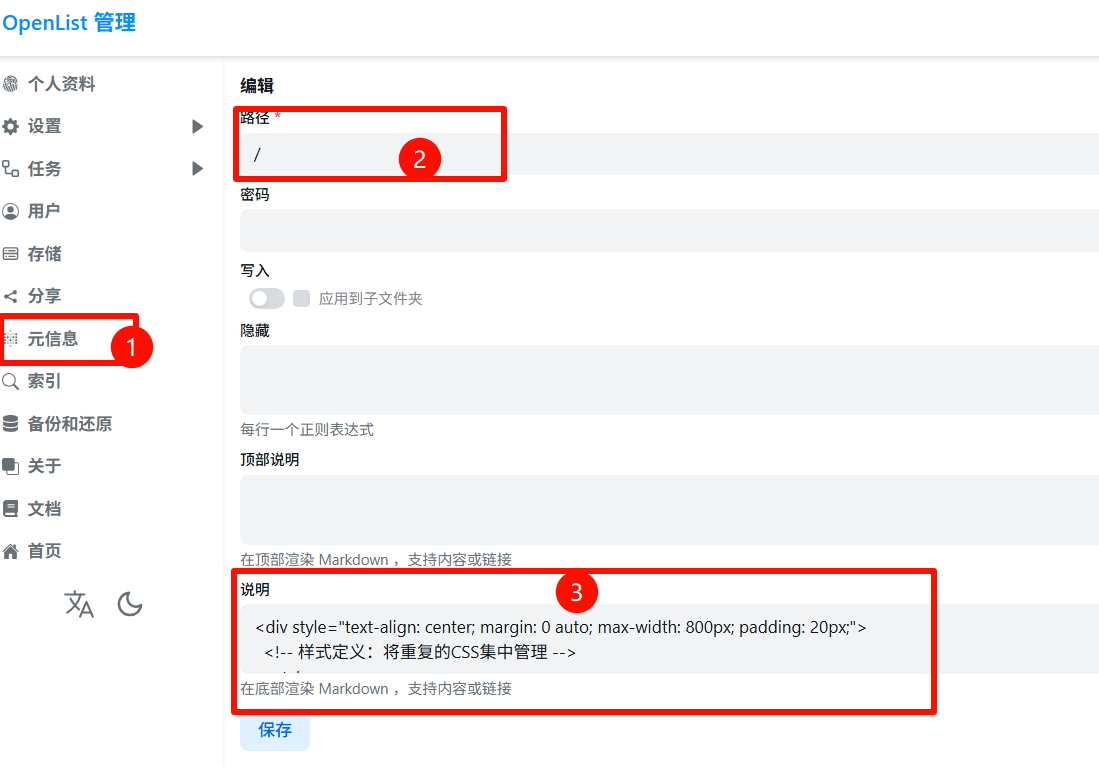
- 在后台设置-元信息-添加-按图输入,最后代码复制粘贴即可。
点击查看
<style>
/* 通用链接样式 */
a {
color: #333;
text-decoration: none;
transition: transform 0.3s ease, color 0.3s ease;
}
a:hover {
transform: scale(1.05) translateY(-2px); /* 微调悬停效果,Grid布局下放大1.1可能会遮挡邻居 */
color: #fecfe8;
}
/* --- 社交链接区域:Grid布局核心代码 --- */
.social-grid {
display: grid;
/* 大屏幕默认:5列,等宽 */
grid-template-columns: repeat(5, 1fr);
gap: 15px; /* 间距 */
margin: 40px 0;
}
/* 社交链接卡片样式 */
.social-link {
display: flex;
align-items: center;
justify-content: center;
text-decoration: none;
color: #333;
background: rgba(255,255,255,0.7);
border-radius: 12px;
padding: 12px;
box-shadow: 0 4px 8px rgba(0,0,0,0.1);
/* Grid布局下,宽度由网格控制,无需设置flex/min-width */
transition: transform 0.3s ease, box-shadow 0.3s ease;
}
.social-link img {
width: 24px;
height: 24px;
margin-right: 10px;
flex-shrink: 0;
}
.social-link span {
font-size: 14px;
white-space: nowrap; /* 防止文字换行 */
}
/* --- 响应式布局:小屏幕 --- */
@media screen and (max-width: 768px) {
.social-grid {
/* 变为 2 列布局 */
grid-template-columns: repeat(2, 1fr);
/* 调整间距 */
gap: 12px;
}
/* 关键代码:让第5个元素独占一行 */
/* nth-child(5) 选中第5个链接 */
.social-link:nth-child(5) {
grid-column: 1 / -1; /* 从第一列跨越到最后一列 */
/* 可选:如果希望第5个按钮居中显示不全宽,取消下面注释 */
/* max-width: 200px; */
/* justify-self: center; */
}
}
/* 极小屏幕微调 */
@media screen and (max-width: 400px) {
.social-link { padding: 10px; }
.social-link span { font-size: 12px; }
}
.footer-text {
font-family: 'Ma Shan Zheng', 'Noto Sans SC', sans-serif;
font-size: 1.4rem; color: #5c5c5c;
margin: 30px 0; line-height: 1.8;
}
</style>
<!-- 主体内容区域 -->
<div style="text-align: center; margin: 0 auto; max-width: 800px; padding: 20px;">
<!-- 图片 -->
<img src="https://i.postimg.cc/6QdKc2Fv/mao-mao.gif" alt="猫猫" style="max-width: 80%; border-radius: 8px; box-shadow: 0 4px 12px rgba(0,0,0,0.1);">
<!-- 社交链接区域:改为 grid 类名 -->
<div class="social-grid">
<a href="https://www.miyoushe.com/sr/accountCenter/postList?id=227165994" class="social-link"><img src="https://img-static.mihoyo.com/favicon.ico" alt="米游社"><span>米游社</span></a>
<a href="https://github.com/qitinyu" class="social-link"><img src="https://github.com/fluidicon.png" alt="Github"><span>Github</span></a>
<a href="https://link3.cc/qtya" class="social-link"><img src="https://tencentcdna.production.link3.cc/profile_images/1771645386577" alt="Bilibili"><span>雨祁Link</span></a>
<a href="https://qm.qq.com/cgi-bin/qm/qr?k=-A9MUAbpO68zcu1YAp11NiI3ir7WczLO" class="social-link"><img src="https://qzonestyle.gtimg.cn/qzone/qzact/act/external/tiqq/logo.png" alt="QQ"><span>QQ</span></a>
<a href="https://yqamm.eu.cc" class="social-link"><img src="https://i.postimg.cc/P58nMvsQ/wang-biao.png" alt="雨祁小窝"><span>雨祁小窝</span></a>
</div>
<!-- 文艺文字 -->
<p class="footer-text" style="color:#000">
生命绚烂,别被黑暗压垮
<span style="color: pink;margin-left: 20px;"><i>  友情联系:<a href="mailto:484894496@qq.com" style="color:pink">484894496@qq.com</a></i></span>
</p>
<!-- 底部导航 -->
<div style="font-size: 15px; font-weight: bold; margin-top: 20px;">
<a href="https://space.bilibili.com/3461582895974946" target="_blank">🐻❄️B站</a> |
<a href="/@manage">😽管理</a> |
<a href="/" target="_blank">🐨主页</a>
</div>
</div>
<!-- 底部提醒区 -->
**⚠️<span style="color:#C2C3C4">希望这些文件可以帮助到你(●'◡'●)</span>**</br>
**⚠️<sapn style="color:#C2C3C4">资源均无偿分享,可能会随时失效/<del>和谐</del>,请及时下载保存(●'◡'●)</span>** 本文采用 CC BY 4.0 协议发布
评论区